
If you’re comparing Darkify vs WP Dark Mode, you’re choosing between the two most talked-about dark mode plugins in the WordPress ecosystem right now. One is the established market leader with 20,000+ active installations. The other is a newer challenger that ships several premium-tier features in its free version. We’ve tested both extensively, and in this comparison, we’ll walk through free features, pro upgrades, performance, support, and pricing so you can decide which one actually fits your site.
Disclosure: Darkify is our plugin. We’ve done our best to keep this comparison factual and balanced, and we openly acknowledge the areas where WP Dark Mode is the stronger choice. All installation counts, ratings, and pricing figures were verified against WordPress.org and each vendor’s official pricing page in July 2026.
Key Takeaways
- WP Dark Mode is the more established plugin, with 20,000+ active installations, a 4.5-star rating across 389 reviews, and a mature ecosystem backed by WPPOOL.
- Darkify is much newer (600+ installations, 5.0 stars across 18 reviews) but includes time-based scheduling, eight color presets, editor dark mode, element-level control, and import/export in its free version — features WP Dark Mode reserves for its Ultimate plan.
- Pricing: Darkify Pro starts at $39/year for a single site (often discounted), while WP Dark Mode Ultimate starts at around $59/year for a single site.
- Choose WP Dark Mode if you want the most battle-tested option, analytics, or the AI preset generator. Choose Darkify if you want the most capable free version or lower-cost pro licensing.
Table of Contents
WP Dark Mode is the safer, more proven choice — it has been on the market longer, serves a far larger user base, and offers extras like usage analytics and an AI-powered preset generator that Darkify doesn’t match. Darkify is the better value — its free version covers scheduling, presets, editor dark mode, and element-level control without an upgrade, and its pro plans cost less. If product maturity matters most to you, pick WP Dark Mode. If free-tier capability and price matter most, pick Darkify.
Dark mode has moved from a novelty to an expectation. Most operating systems and major apps now ship with a dark theme, and visitors increasingly expect websites to respect that preference. For WordPress site owners, the practical question isn’t whether to offer dark mode — it’s which plugin to trust with it.
WP Dark Mode, developed by WPPOOL, has been the category leader for years. Darkify, developed by our team at ThemeAtelier, entered the market more recently with a different strategy: put the features people usually pay for into the free tier. Both plugins were last updated on June 24, 2026, and both are tested up to WordPress 7.0.1, so neither is at risk of abandonment.
So how do they actually compare when you line them up feature by feature? Let’s start with the numbers.
Darkify vs WP Dark Mode: Side-by-Side Comparison
| Darkify | WP Dark Mode | |
|---|---|---|
| Developer | ThemeAtelier | WPPOOL |
| Active installations | 600+ | 20,000+ |
| WordPress.org rating | 5.0 (18 reviews) | 4.5 (389 reviews) |
| Last updated | June 24, 2026 | June 24, 2026 |
| OS-aware auto dark mode | Free | Free |
| Time-based scheduling | Free | Ultimate |
| Color presets (free) | 5 | 2 |
| Editor dark mode (Gutenberg + Classic) | Free | Partial free / Ultimate |
| Element-level include/exclude control | Free | Ultimate |
| Import/export settings | Free | Ultimate |
| AI preset generator | Not available | Ultimate |
| Dark mode usage analytics | Not available | Free (email reports in Ultimate) |
| Image/video replacement by mode | Pro | Ultimate |
| Pro pricing (single site) | From $39/year | From ~$59/year |
Which Plugin Has the Better Free Version?
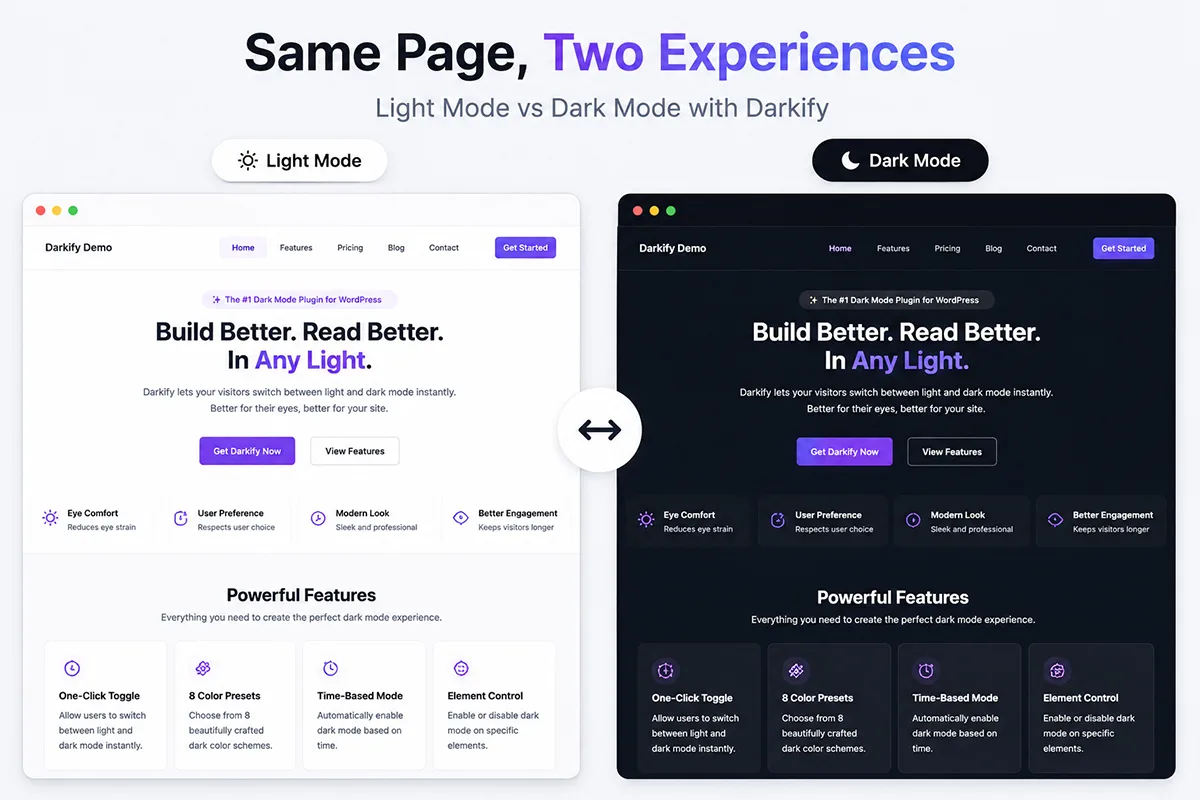
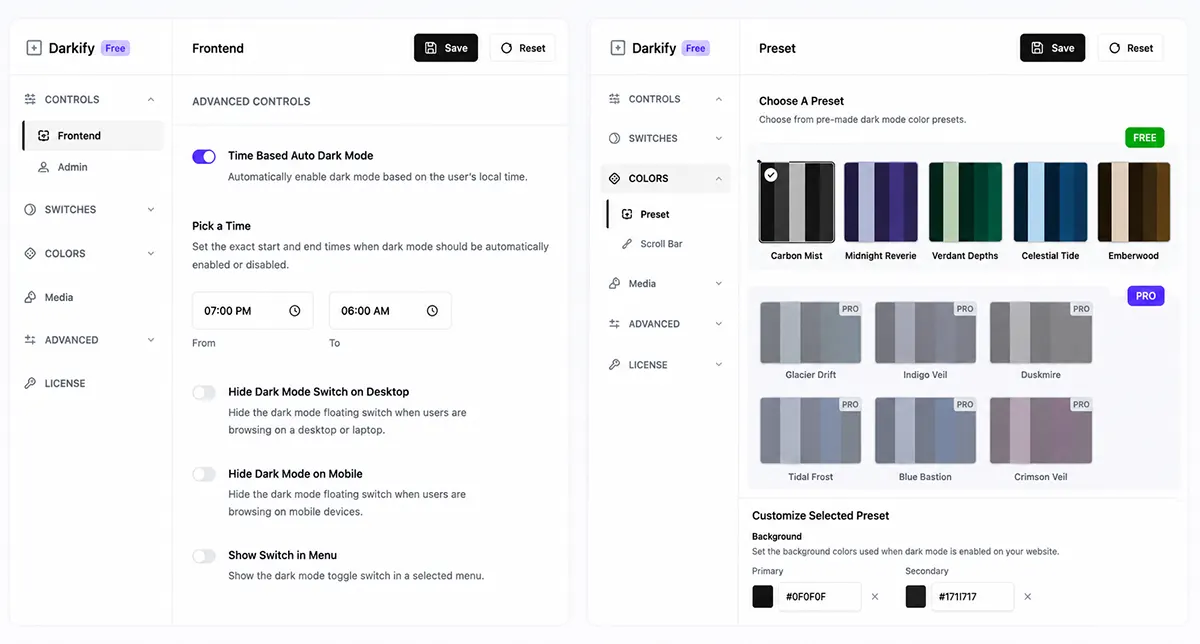
This is where the two plugins diverge most sharply, and in our testing, it’s Darkify’s strongest argument. Darkify’s free version includes five capabilities that WP Dark Mode reserves for its paid Ultimate plan: time-based scheduling, eight built-in color presets, editor-specific dark mode, element-level dark mode control, and import/export of settings.
In practice, that means a free Darkify install can automatically switch your site to dark mode at 7 p.m., exclude a specific logo or embed from color inversion using a CSS class, give you a dark writing environment in both Gutenberg and the Classic Editor, and carry your settings to a staging site — all without spending anything.
WP Dark Mode’s free version is still genuinely useful. You get the floating toggle switch, OS-aware detection, admin dashboard dark mode, two color presets, an image brightness adjustment, custom CSS support, and — notably — built-in dark mode analytics, which Darkify doesn’t offer at any tier. If you want to know what percentage of your visitors actually use dark mode, WP Dark Mode is the only one of the two that can tell you.
But the free-tier feature gap is real. If your requirement list includes scheduling or fine-grained element control and your budget is zero, Darkify covers it, and WP Dark Mode doesn’t.
How Do the Pro Versions Compare?
At the paid tier, the picture shifts in WP Dark Mode’s favor. Its Ultimate plan is the more feature-rich premium product, reflecting years of additional development. Ultimate adds 21 floating switch styles, 13 premium color presets, an AI-powered preset generator, mode-based image and video replacement, a font size toggle for accessibility, WooCommerce and custom post type exclusions, email reporting on usage analytics, and dedicated performance optimization settings.
The AI preset generator deserves a specific mention. Instead of manually tuning background, text, and link colors, you describe or generate a palette, and the plugin builds the preset. Darkify has no equivalent — with Darkify, you’re choosing from the eight presets or configuring colors manually. For users who want dark mode to precisely match an existing brand palette without design work, this is a genuine WP Dark Mode advantage.
Darkify Pro focuses on a tighter feature set: mode-based image replacement, additional switch styles and placement options, and priority support, layered on top of a free version that already covers most day-to-day needs. Because so many ships are free, the pro upgrade is less of a functional unlock and more of a refinement. Whether that’s a strength or a weakness depends on your perspective — you upgrade Darkify because you want more polish, whereas you upgrade WP Dark Mode because core features like scheduling sit behind the paywall.
Performance: Does Either Plugin Slow Down Your Site?
In our testing, neither plugin produced a slowdown that a visitor would notice. Both take a similar technical approach — a lightweight script plus CSS-based color transformation — rather than generating duplicate dark stylesheets for the whole theme, so the front-end footprint of each is small.
We’re deliberately not publishing millisecond-level benchmark numbers here, because results vary heavily with your theme, hosting, and caching setup, and we haven’t found an independent, reproducible benchmark comparing the two. What we can say from experience is directional: Darkify’s smaller codebase keeps its asset payload minimal, while WP Dark Mode Ultimate includes explicit performance controls — asynchronous script loading and footer script placement — that let you tune how and when its assets load.
Our honest advice: test both on a staging copy of your own site with your own caching stack, and measure with PageSpeed Insights before and after. For a broader look at how dark mode plugins behave across different setups, see our comparison of the best WordPress dark mode plugins.
Support and Documentation
WP Dark Mode benefits from the infrastructure of a larger company. WPPOOL maintains extensive documentation, video tutorials, and a knowledge base built up over the years, and Ultimate customers get live chat and VIP support. With 20,000+ installations, most problems you’ll hit have already been asked and answered somewhere — that long tail of community knowledge is an underrated advantage of choosing the market leader.
Darkify’s support surface is smaller but faster-moving. As a smaller team, we handle support directly, and the plugin’s 5.0-star average on WordPress.org — with reviewers repeatedly citing support quality — reflects that. The honest caveat: 18 reviews is a small sample compared to WP Dark Mode’s 389, and a smaller team also means a smaller documentation library. If you prefer self-serve troubleshooting over filing a ticket, WP Dark Mode’s ecosystem is more mature.
Darkify vs WP Dark Mode Pricing: Which Costs Less?
Darkify is the least expensive option at every tier. A single-site Darkify Pro license lists at $39/year, a five-site license at $79/year, and unlimited sites at $139/year, with lifetime licenses from $119 one-time. At the time of writing, Darkify’s pricing page shows substantial promotional discounts on all plans (a single site drops to $15.60/year), and every plan carries a 14-day no-questions refund policy.
WP Dark Mode Ultimate starts at around $59/year for a single site and roughly $99/year for five sites, with lifetime licenses aimed at agencies covering up to 50 or even 1,000 sites. WPPOOL also runs frequent promotions, so real-world prices are often below list.
Two things to keep in mind when comparing cost. First, list prices on both sides move often, so check the vendors’ pricing pages for current figures. Second, the more meaningful comparison for many users isn’t pro vs pro — it’s Darkify Free vs WP Dark Mode Ultimate, because scheduling and element control are free in one and paid in the other. If those are the features you need, your Darkify cost is zero.
Which Dark Mode Plugin Should You Choose?
There’s no single winner here — the best dark mode plugin depends on what you’re optimizing for. Here’s how we’d decide in specific situations.
- You want maximum features without paying: Choose Darkify. Scheduling, eight presets, editor dark mode, element-level control, and import/export are all free.
- You want the most proven, widely deployed option: Choose WP Dark Mode. A 20,000+ install base and years of iteration mean fewer surprises and more community answers.
- You need dark mode analytics: Choose WP Dark Mode. It’s the only one of the two that tracks how many visitors use dark mode.
- You want AI-generated color schemes matched to your brand: Choose WP Dark Mode Ultimate. Darkify has no AI preset tool.
- You run a WooCommerce store on a budget: Darkify’s free element-level control lets you exclude product images and badges from inversion without upgrading; WP Dark Mode handles WooCommerce exclusions in Ultimate.
- You manage many client sites: Compare Darkify’s $139/year unlimited-sites plan against WP Dark Mode’s high-site-count lifetime licenses — which is cheaper depends on your time horizon and site count.
Darkify vs WP Dark Mode Frequently Asked Questions
Is Darkify or WP Dark Mode better for beginners?
Both are beginner-friendly, with one-click setup and a floating toggle that works out of the box. WP Dark Mode offers more tutorials and documentation, which helps self-learners. Darkify requires fewer decisions about upgrading, since scheduling and presets already work in the free version.
Does Darkify’s free version really include scheduling?
Yes. Time-based automatic switching between light and dark themes is included in the free version of Darkify, alongside OS-aware detection. In WP Dark Mode, scheduling is part of the paid Ultimate plan. You can verify the feature list on Darkify’s WordPress.org page.
Why does WP Dark Mode have so many more installations than Darkify?
Time on market, mostly. WP Dark Mode launched years earlier and built its 20,000+ install base through sustained development and marketing. Darkify is a newer plugin with 600+ installations. A larger install base is a legitimate trust signal — it means broader real-world testing across themes and hosting environments.
Can I switch from WP Dark Mode to Darkify later?
Yes, though settings don’t transfer between the two plugins automatically. You’d deactivate one, activate the other, and reconfigure your toggle placement, colors, and exclusions. Darkify’s import/export feature helps if you’re replicating a Darkify setup across multiple sites, but there’s no cross-plugin migration tool in either direction.
Do these plugins work with any WordPress theme?
Both are theme-agnostic, and both are tested up to WordPress 7.0.1 as of their June 2026 updates. Because dark mode plugins transform your existing colors, results vary by theme — heavily image-based designs may need per-element adjustments, which is where Darkify’s free element-level control or WP Dark Mode Ultimate’s exclusions come in.
If we strip away the fact that Darkify is our plugin, here’s the fairest summary we can give. WP Dark Mode is the more mature product: bigger install base, longer track record, richer documentation, analytics, and an AI preset generator that has no Darkify equivalent. If you want the option that the largest number of WordPress users have already validated, choose WP Dark Mode, and you won’t regret it.
Darkify’s case rests on value. Its free version includes scheduling, eight presets, editor dark mode, element-level control, and import/export — a set of features that would otherwise require WP Dark Mode’s Ultimate plan — and its pro pricing starts lower at $39/year. For budget-conscious site owners, bloggers, and small stores, the free tier covers everything most sites need.
Both plugins are actively maintained and safe choices. Try the free version of each — Darkify and WP Dark Mode are both a two-minute install — and let your own site decide. And if you’d like to see how they stack up against the rest of the field, our roundup of the best WordPress dark mode plugins in 2026 compares six options side by side.