
Before comparing features, most site owners are actually deciding something bigger: which communication channel their customers already use. Finding the best WordPress chat plugin starts with choosing between WhatsApp, Facebook Messenger, and a traditional on-site live-chat widget — not with a feature checklist.
Customer habits, staffing, and how quickly you can realistically respond matter more than any single plugin’s feature list. This guide compares two ThemeAtelier plugins built around WhatsApp and Messenger, plus established live-chat and omnichannel alternatives, so you can match the tool to how your customers actually want to reach you.
What is the best WordPress chat plugin? ChatHelp is a strong fit when customers prefer WhatsApp. Better Chat Support suits businesses with an active Facebook and Messenger audience. A traditional live-chat platform works better when you need an on-site inbox, automation, or a structured support-team workflow. The right choice depends on audience behavior and staffing, not on which plugin has the longest feature list.
Editorial disclosure: ThemeAtelier develops ChatHelp and Better Chat Support for Messenger. This guide also evaluates independent live-chat and omnichannel alternatives on their own merits, to help you choose the right communication model for your site.
Key Takeaways
- ChatHelp fits WhatsApp-first businesses — service providers and WooCommerce stores whose customers already message on WhatsApp.
- Better Chat Support fits Facebook-driven businesses — local businesses and pages that already generate inquiries through Facebook and Messenger.
- Traditional live chat fits support teams needing an on-site inbox, transcripts, and workflows that don’t depend on a visitor’s social accounts.
- Conversation continuity differs by channel: WhatsApp and Messenger conversations continue in the visitor’s own app; most live chat depends on the browser session unless email is captured.
- WhatsApp and Messenger create less visitor friction than live chat for mobile users already logged into those apps, but they require the visitor to have an account there.
- Multiple channels can run on one site, but only when staffing can realistically cover both — otherwise it just adds notifications no one answers.
- The most important factor is audience habit, not feature count: pick the channel your customers already use before comparing plugin extras.
Table of Contents
Chat Options at a Glance
| Factor | Messenger | Traditional live chat | |
|---|---|---|---|
| Where the conversation happens | Visitor’s WhatsApp app | Visitor’s Messenger app | On-site widget or agent dashboard |
| Visitor account required | Yes, WhatsApp | Yes, Facebook/Messenger | Usually no account needed |
| Continues after leaving site | Yes, in WhatsApp | Yes, in Messenger | Plan-dependent |
| Typical audience | Mobile-first, messaging-habit customers | Existing Facebook followers | Any website visitor |
| Mobile experience | Native app handoff | Native app handoff | In-browser widget |
| Desktop experience | WhatsApp Web or app | Messenger.com or app | In-browser widget |
| Response expectations | Often asynchronous | Often asynchronous | Usually near-immediate |
| Multiple-agent workflow | Plan-dependent | Plan-dependent | Common on paid plans |
| Automation potential | Limited without added tools | Limited without added tools | Often built in |
| Setup effort | Low, button-based | Low, button-based, needs a Facebook Page | Moderate, dashboard setup |
| External platform dependence | Meta / WhatsApp | Meta / Facebook | Chat vendor’s platform |
| Best use case | Messaging-habit, mobile-first customers | Facebook-sourced traffic and communities | Structured support with transcripts |
WhatsApp vs Messenger vs Live Chat
Audience Habits
WhatsApp works best where customers already use it daily for personal and business messaging. Messenger suits businesses with an active Facebook Page or community, since it meets visitors where they already engage. Live chat is channel-neutral — it doesn’t require a visitor to have any particular app installed.
Response Expectations
Live chat implies a near-immediate reply, since visitors see it as “live.” WhatsApp and Messenger tend to support more asynchronous conversations, closer to texting. Whichever channel you choose, set clear availability expectations — don’t display a chat option as live when no one is actually free to answer it.
Conversation Continuity
WhatsApp and Messenger conversations continue in the visitor’s own account after they leave your site. Website live chat varies by platform: some rely on browser sessions or cookies, others capture an email to continue by transcript. Confirm this behavior for the specific live-chat product you’re considering rather than assuming it works one way.
Setup and Management
A click-to-chat button is usually a quick install: add the plugin, enter a number or Page ID, done. A full live-chat dashboard takes more setup — training agents, setting business hours, and managing notifications across a team. Weigh that extra effort against what your support workflow actually needs.
Privacy and Platform Dependence
Every option here depends on a third party to some degree: WhatsApp and Messenger route through Meta, and most live-chat widgets run on an external vendor’s servers. Each involves cookies, tracking, or data processing worth disclosing in your privacy policy. Check regional consent requirements for your audience — this isn’t legal advice, just a reminder to verify.
When Each Channel Makes Sense
Local service businesses and WooCommerce stores with mobile-first customers often do well with WhatsApp. Businesses with an active Facebook community lean toward Messenger. Support teams needing ticket history and multiple agents usually need a full live-chat platform rather than either social channel alone.
Plugin Comparison Table
| Plugin | Primary channel | Best for | Free option | Multiple agents | WooCommerce | Automation | Continues off-site | External account | Main limitation | Verdict |
|---|---|---|---|---|---|---|---|---|---|---|
| ChatHelp | WhatsApp-first, WooCommerce | Yes | Pro only | Yes, free | Limited | Yes | Visitor needs WhatsApp | Best for WhatsApp | ||
| Better Chat Support | Messenger | Facebook-driven audiences | Yes | Pro only | Pro only | Limited | Yes | Facebook Page | Depends on a connected Page | Best for Facebook audiences |
| Tidio | Live chat + WhatsApp (paid) | Omnichannel support teams | Yes, WhatsApp needs paid plan | Yes, paid plans | Cart recovery | Yes, Lyro AI | Plan-dependent | Tidio account | WhatsApp not on free plan | Best omnichannel platform |
| tawk.to | Live chat | Free, unlimited-agent support | Yes, generous free plan | Yes, unlimited free | Not confirmed | Paid tiers only | No, on-site | tawk.to account | No native automation free | Best free live chat |
ChatHelp: Best for WhatsApp-First Businesses
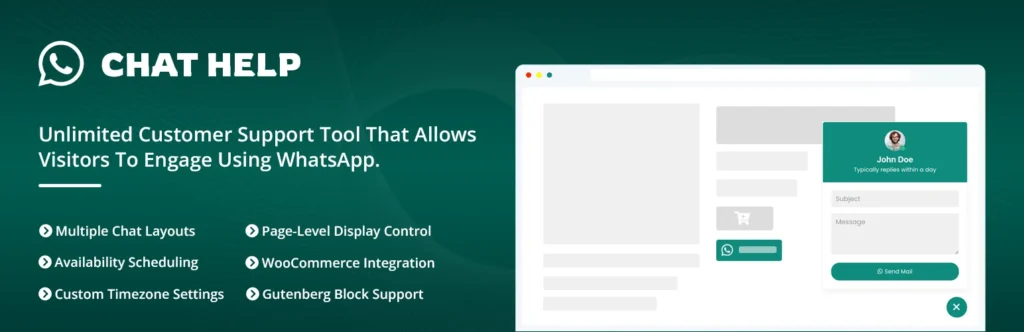
Many customers would rather message on WhatsApp than fill out a form, especially on mobile. ChatHelp adds a floating WhatsApp button using click-to-chat links, distinct from an embedded website live-chat system — the conversation moves into the visitor’s own WhatsApp app and continues there after they leave your site.
Best for: service businesses and WooCommerce stores whose customers already use WhatsApp for quotes, product questions, or service-area confirmations. Verified free features: multiple bubble layouts, WooCommerce buttons on shop, product, cart, and checkout pages, dynamic pre-filled messages, page-level targeting, and a built-in analytics dashboard. Pro adds: multi-agent routing so inquiries reach the right person, unlimited custom form fields, and webhook integration.
Limitations: the visitor needs WhatsApp installed, click-to-chat isn’t the same as the full WhatsApp Business Platform or API, and ChatHelp doesn’t replace a help-desk system for teams needing shared tickets. Choose another option if your audience mostly emails, calls, or has no WhatsApp habit. Businesses that already receive customer questions through WhatsApp can start with the free version of ChatHelp and compare Pro tools when they need more agents, targeting, or control.
Better Chat Support for Messenger: Best for Facebook Audiences
Better Chat Support for Messenger suits businesses with an active Facebook Page, since visitors move from a floating website button into a Messenger conversation. It requires connecting a Facebook Page ID — a business Page, not a personal profile — and uses the click-to-Messenger link model rather than Meta’s older embedded chat widget, which was deprecated in 2024 and no longer functions.
Best for: local businesses and pages that already generate leads through Facebook. Verified free features: customizable button styles and animations, greeting and offline messaging, page-level targeting, device-specific visibility, availability scheduling with timezone control, and a built-in analytics dashboard. Pro adds: unlimited chat agents (free is single-agent) and a faster support response guarantee; the Pro page also references connecting other channels like WhatsApp and Telegram, which is worth confirming directly since it isn’t detailed on the free WordPress.org listing.
Limitations: the business depends on Meta’s platform and policies, visitors need a Facebook or Messenger account, and Messenger adoption varies by region and audience. Choose another option if your traffic doesn’t originate from Facebook. Businesses that generate leads through Facebook can try Better Chat Support free and review Pro options when they need more agents or display control.
Tidio: Best Omnichannel Platform
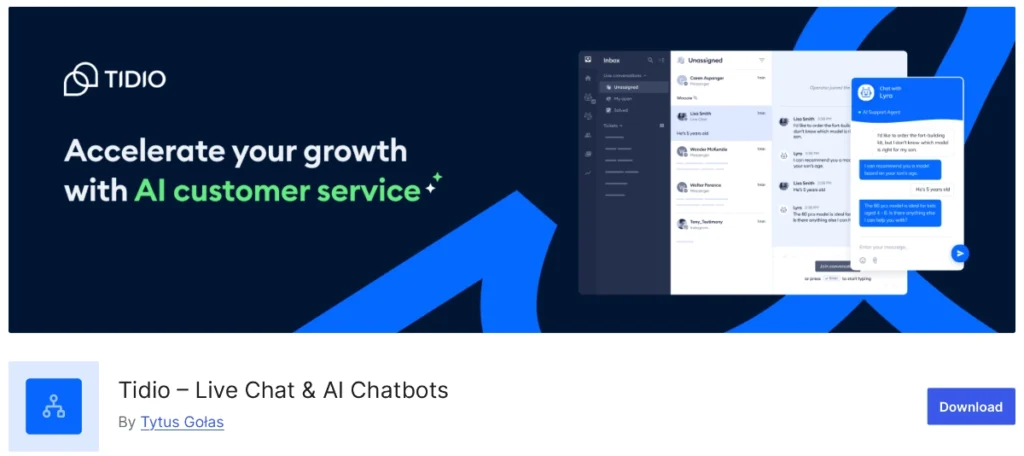
Tidio isn’t a WhatsApp or Messenger plugin — it’s a broader live-chat and AI-chatbot platform where WhatsApp is one connected channel on paid plans. It’s included here for readers really deciding between a lightweight button and a full support platform with a shared inbox.
Best for: teams wanting live chat, an AI chatbot, and WhatsApp in one dashboard rather than separate tools. Verified features: a live-chat widget, the Lyro AI chatbot, and WooCommerce cart-recovery triggers. Limitations: WhatsApp isn’t on the free plan — it needs at least the Starter tier, priced from $24.17/month per Tidio’s pricing page, making it heavier than a dedicated plugin if WhatsApp is your only need. Choose another option if you only want a simple channel button rather than a full support platform.
tawk.to: Best Free Live Chat
tawk.to is a traditional on-site live-chat widget with a genuinely free plan: unlimited agents, unlimited messaging, ticketing, and a knowledge base, with over 100,000 active WordPress installations. It requires a free tawk.to account to manage conversations.
Best for: support teams wanting a real live-chat inbox without a monthly fee. Limitations: AI automation is a paid add-on, and WooCommerce-specific features weren’t confirmed on the official listing. Choose another option if your customers strongly prefer WhatsApp or Messenger over an on-site widget.
Which Channel Is Best by Business Type?
- Local service business: WhatsApp — customers often already text similar businesses.
- Small WooCommerce store: WhatsApp or a combination, depending on how mobile-first your buyers are.
- Consultant or freelancer: WhatsApp or Messenger, whichever channel your inquiries already arrive through.
- Restaurant or hospitality business: WhatsApp for quick questions; Messenger if bookings already come from Facebook.
- Business with a large Facebook following: Messenger — it meets an existing audience where they already engage.
- International business: WhatsApp, given its broad global messaging use, though always confirm regional habits.
- SaaS or technical-support team: Live chat — ticket history and multi-agent routing matter more than channel familiarity.
- Solo business owner: One channel only — the one you can realistically monitor yourself.
- Agency managing several brands: Live chat, for shared reporting and consistent workflows across clients.
- Business needing 24/7 automation: An omnichannel platform with a chatbot, since neither click-to-chat plugin adds automation on its own.
Can You Use WhatsApp and Messenger Together?
ChatHelp and Better Chat Support can run on the same WordPress site where technically compatible, letting visitors choose WhatsApp or Messenger based on what they already use. This helps when your traffic genuinely splits between both audiences — some from search or referrals preferring WhatsApp, others arriving from Facebook already expecting Messenger.
The risk is clutter: too many floating buttons in one corner, confusing calls to action, and notifications split across two apps your team has to check separately. Use different positions or prioritize one channel per page, avoid covering mobile navigation, checkout buttons, or cookie notices, and confirm both plugins actually work cleanly with your specific theme before launch rather than assuming universal compatibility.
Live Chat vs Click-to-Chat
Click-to-chat tools like ChatHelp and Better Chat Support open an external app, need less on-site infrastructure, and let the conversation continue wherever the visitor already is. Traditional live chat opens directly on your website through an agent dashboard, can support bots, routing, and transcripts, and works for visitors without WhatsApp or Facebook — at the cost of more setup and ongoing monitoring. Neither model is universally better; it depends on your audience and support capacity.
How to Choose the Right WordPress Chat Plugin
- Which messaging app do your customers already use?
- Should visitors need an external account to reach you?
- Must conversations continue after the visitor leaves your site?
- How many agents need to respond, and do you need a shared inbox?
- Does the business need WooCommerce buttons or automation?
- What are your realistic business hours and response speed?
- What privacy and consent disclosures does the channel require?
- What’s your budget, and does pricing scale with agents or contacts?
Choose the simplest tool that actually supports your real workflow, not the one with the most features.
Performance and User-Experience Considerations
Chat tools add JavaScript, network requests, floating elements, and sometimes cookies or tracking events, so test Core Web Vitals before and after installing any of them — don’t assume a plugin is lightweight without checking. Avoid running duplicate widgets for the same channel, confirm the mobile layout doesn’t hide checkout or form controls, and keep sufficient contrast and clear labels on any floating button.
Free vs. Paid Chat Plugins
Free versions are usually enough for one channel, one agent, basic customization, and low support volume — a solid way to test whether a channel actually gets used. Paid plans earn their cost once you need multiple agents, advanced targeting or scheduling, WooCommerce integration, analytics, or priority support. Paid isn’t automatically better results — it’s worth it when a specific limitation is genuinely in your way.
Final Recommendation
Choose ChatHelp when WhatsApp is your audience’s preferred channel. Choose Better Chat Support when your business already attracts and serves customers through Facebook. Choose a traditional live-chat platform like tawk.to or Tidio when you need an on-site inbox, team workflows, or automation. Use WhatsApp and Messenger together only when both audiences are meaningful and your team can respond to both consistently.
Try ChatHelp free on WordPress.org, or review the available ChatHelp Pro features. Try Better Chat Support free, or compare its Pro options. Both can run side by side when a broader channel choice genuinely benefits your visitors, or browse the full ThemeAtelier plugin catalog for more tools.
Frequently Asked Questions
What is the best WordPress chat plugin?
There’s no single best plugin — it depends on the channel. ChatHelp suits WhatsApp-first audiences, Better Chat Support suits Facebook-driven businesses, and a live-chat platform like tawk.to or Tidio suits teams needing an on-site inbox and structured workflows.
Is WhatsApp or live chat better for a website?
Neither is universally better. WhatsApp lowers friction for mobile customers already using it daily but requires them to have the app. Live chat works for any visitor without an account but usually implies a faster, on-site response. Choose based on audience habits and your realistic response speed.
What is the difference between Messenger and WhatsApp chat?
Both use a click-to-chat link model rather than an embedded widget. WhatsApp suits customers already using it for personal or business messaging, while Messenger suits businesses with an existing Facebook Page and audience. The technical setup differs too — Messenger requires connecting a verified Facebook Page.
Can I add WhatsApp chat to WordPress for free?
Yes. ChatHelp’s free WordPress.org version adds a floating WhatsApp button with WooCommerce placements and basic customization. Multi-agent routing and advanced targeting are reserved for the paid Pro version, but the free tier is fully usable for a single-agent setup.
Can I add Facebook Messenger to WordPress?
Yes, using a plugin like Better Chat Support, which connects a Facebook Page ID and opens a Messenger conversation through a click-to-chat link. Meta’s older embedded chat widget was deprecated in 2024, so current plugins rely on this link-based approach rather than an on-site iframe.
Can I run WhatsApp and Messenger chat on the same website?
Yes, where the plugins are technically compatible, letting visitors pick their preferred channel. Avoid stacking multiple floating buttons in the same corner, and make sure your team can realistically monitor notifications from both channels before enabling them together.
Which converts better, WhatsApp or Messenger?
Neither channel converts better universally. Results depend on audience adoption, traffic source, the offer, device mix, response time, trust, and how well the channel is implemented on your specific site. Test with your own audience rather than assuming one channel wins by default.
Does a WordPress chat plugin slow down a website?
It can, depending on the scripts and tracking it loads. A well-built click-to-chat button typically adds minimal weight since it doesn’t load a full interface until clicked. Test Core Web Vitals before and after installing any chat plugin rather than assuming it’s lightweight.
Is click-to-chat the same as the WhatsApp Business API?
No. Click-to-chat plugins use simple wa.me-style links that open a conversation in WhatsApp. The WhatsApp Business Platform is a separate, more advanced system involving approved business accounts, message templates, and often per-conversation charges through third-party providers — a standard plugin doesn’t provide this automatically.
Does live chat continue after a visitor leaves the website?
It depends on the platform. Some live-chat tools rely on browser sessions or cookies and lose continuity once the visitor leaves; others capture an email to continue by transcript. WhatsApp and Messenger conversations, by contrast, persist in the visitor’s own account regardless of the website session.