
Best WooCommerce Plugins for WordPress
WooCommerce is a powerful platform for building online stores, but on its own, it only provides the basics. To truly grow sales, improve user experience, and streamline store management, you need the best WooCommerce plugins for WordPress. The right plugins help extend WooCommerce’s functionality across key areas such as conversions, design, marketing automation, and customer support.
In this guide, we’ve curated a list of the best WooCommerce plugins updated for 2026, covering both ThemeAtelier’s own WooCommerce tools and trusted third-party plugins used by store owners worldwide. Whether you’re running a small shop or scaling a high-traffic store, these plugins can help you build a faster, more engaging, and more profitable WooCommerce website.
Table of Contents
Why WooCommerce Plugins Are Essential for Online Stores
WooCommerce is flexible and developer-friendly, but out of the box it offers only the core functionality needed to run an online store. While this minimal approach keeps WooCommerce lightweight, it also means many essential features must be added through plugins.
WooCommerce plugins help store owners enhance key areas such as conversions, customer support, design and user experience, and workflow automation. From improving how products are displayed to enabling live chat, upsells, or smarter checkout experiences, plugins allow you to tailor your store to meet real business goals.
Choosing the right plugins is critical. Smart plugin selection ensures your store remains fast, scalable, and easy to manage while delivering a strong return on investment. Instead of adding unnecessary complexity, well-built WooCommerce plugins help you improve performance, increase revenue, and provide a better shopping experience for your customers.
How We Selected the Best WooCommerce Plugins
With thousands of WooCommerce plugins available, choosing the right ones can be overwhelming. To ensure this list delivers real value, we evaluated each plugin using practical, experience-based criteria focused on performance, reliability, and long-term usability.
We prioritized plugins that are actively developed and regularly updated to stay compatible with the latest versions of WooCommerce and WordPress. Compatibility was a key factor, as poorly maintained plugins can cause conflicts or performance issues.
We also considered real-world use cases, focusing on plugins that solve common store challenges such as increasing conversions, improving customer communication, or enhancing the shopping experience. Performance impact was carefully reviewed to ensure plugins remain lightweight and do not slow down WooCommerce stores.
Finally, we looked at user reviews, adoption rates, and overall value—comparing free and premium offerings to identify plugins that deliver the best return on investment. This approach helps ensure every plugin featured in this list is practical, trustworthy, and worth considering for serious WooCommerce store owners.
Best WooCommerce Plugins You Can Use Today
ThemeAtelier WooCommerce Plugins (Our Picks)
Disclosure: The following plugins are developed by ThemeAtelier.
Chat Help – WhatsApp Chat for WooCommerce (Free & Pro)
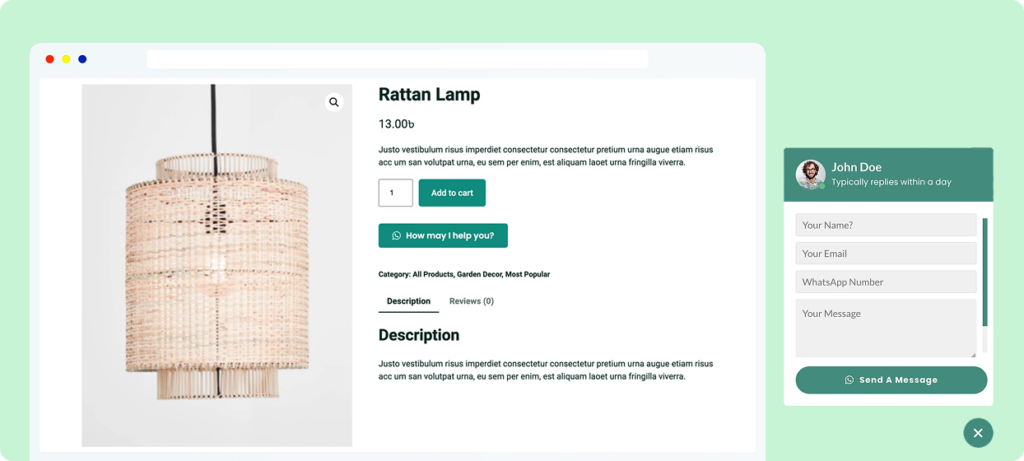
Short description: Chat Help adds WhatsApp chat buttons, custom forms, and multi-agent support to your WooCommerce store, making it easy for customers to contact you instantly before or after purchase.
Best for: WooCommerce store owners who want to improve customer support and increase conversions through real-time communication.
Key WooCommerce features:
- Floating WhatsApp chat button on product and shop pages
- Pre-filled messages for faster inquiries
- WooCommerce product-based messaging
- Multi-agent support for sales and support teams
Why it stands out: Chat Help removes friction from customer communication by meeting shoppers where they already are—on WhatsApp—helping reduce abandoned carts and increase trust.
Darkify – Dark Mode Plugin (Free & Pro)
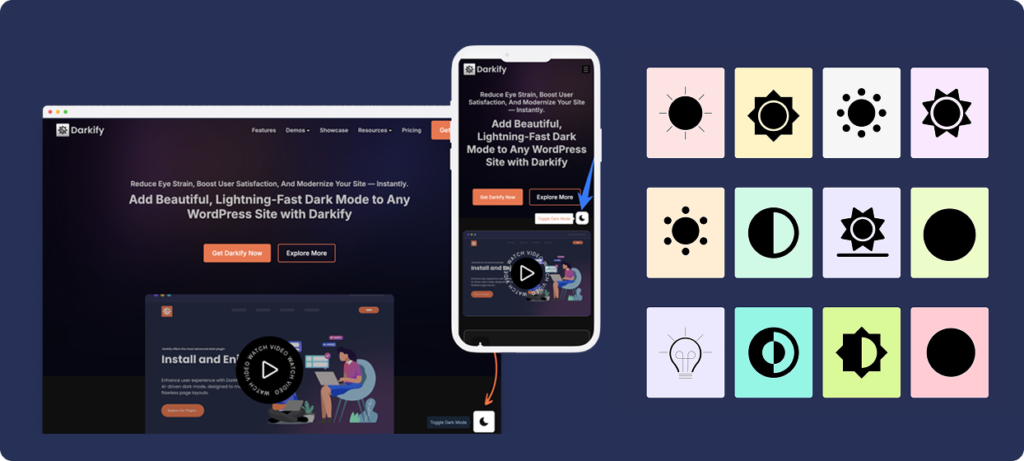
Short description: Darkify lets customers switch between light and dark mode on your WooCommerce store, improving visual comfort and creating a modern shopping experience.
Best for: Stores with content-heavy pages, frequent visitors, or night-time shoppers who value accessibility and comfort.
Key WooCommerce features:
- Dark mode toggle for shop, product, cart, and checkout pages
- Works with any WooCommerce theme
- Lightweight and performance-friendly
- Compatible with Elementor-built product pages
Why it stands out: Darkify enhances the shopping experience without affecting store performance, making it an ideal UX upgrade for modern WooCommerce stores.
Greet Bubble – Video Welcome & Engagement Plugin (Free & Pro)

Short description: Greet Bubble displays a friendly video bubble or message on your WooCommerce store to welcome visitors and guide them toward support or contact options.
Best for: Store owners who want to create a more personal, human connection with first-time visitors and customers.
Key WooCommerce features:
- Video or message-based welcome bubble
- Quick links to contact forms, WhatsApp, or Messenger
- Custom positioning and display rules
- Works seamlessly on WooCommerce pages
Why it stands out: Greet Bubble helps WooCommerce stores build trust instantly by adding a human touch that encourages engagement and customer interaction.
Better Chat Support for Messenger (Free & Pro)

Short description: Better Chat Support for Messenger adds Facebook Messenger chat to your WooCommerce store, allowing customers to ask questions and get support directly from product pages.
Best for: WooCommerce stores with active Facebook pages that want to offer instant messaging support.
Key WooCommerce features:
- Messenger chat button on WooCommerce pages
- Product-aware messaging for faster support
- Customizable chat layouts and triggers
- Mobile-friendly and responsive
Why it stands out: By integrating Messenger into WooCommerce, this plugin makes it easier to convert social traffic into customers while keeping communication centralized.
Best Third-Party WooCommerce Plugins (Trusted Tools)
Best Free vs Premium WooCommerce Plugins
Both free and premium WooCommerce plugins can play an important role in building a successful online store. The right choice depends on your store’s goals, complexity, and growth plans.
Free WooCommerce plugins are often enough for new or small stores. They provide essential features, allow you to test functionality, and help you get started without upfront costs. Many well-maintained free plugins offer reliable performance and are perfectly suitable for basic use cases.
Premium WooCommerce plugins become valuable as your store grows. They typically offer advanced features, deeper customization, priority support, and ongoing improvements that can save time and reduce operational friction. For stores focused on conversions, automation, or scalability, premium plugins often justify their cost.
When evaluating pricing models, it’s also important to consider lifetime deals versus subscriptions. Lifetime licenses can offer strong long-term value, while subscriptions may be better for tools that require constant updates or third-party integrations. Ultimately, adopting an ROI mindset—choosing plugins based on the value they deliver rather than price alone—helps ensure smarter, more sustainable plugin investments.
How to Choose the Right WooCommerce Plugins for Your Store
Selecting the right WooCommerce plugins is about more than adding features—it’s about protecting performance, stability, and long-term growth. Before installing any plugin, it’s important to evaluate a few key factors.
Start by checking the plugin’s update frequency. Regular updates indicate active development and ongoing compatibility with new WooCommerce and WordPress releases. Compatibility is critical, as outdated plugins can cause conflicts or break important store functionality.
Support quality is another essential consideration. Responsive support can save hours of troubleshooting when issues arise, especially during high-traffic sales periods. Performance impact should also be reviewed, as poorly optimized plugins can slow down your store and negatively affect conversions.
Scalability matters as your store grows. Choose plugins that can handle increased traffic, larger product catalogs, and more complex workflows. Finally, look for plugins that offer a refund policy or trial option, which allows you to test functionality and confirm value before fully committing.
Common Mistakes to Avoid When Installing WooCommerce Plugins
WooCommerce plugins can significantly improve your store, but using them incorrectly can create performance and stability issues. One of the most common mistakes is installing too many plugins. Each additional plugin increases complexity, and unnecessary features can slow down your store or create conflicts.
Another frequent issue is overlapping functionality. Installing multiple plugins that serve the same purpose—such as several chat tools or discount systems—can lead to unexpected behavior and harder maintenance. Performance should also never be ignored. Even feature-rich plugins can harm conversions if they negatively impact page speed.
Using abandoned or poorly maintained plugins is another major risk. Plugins that are no longer updated may become incompatible with WooCommerce updates or introduce security vulnerabilities. Finally, always test plugin updates in a staging environment when possible. Updating plugins without testing can cause issues that affect checkout, payments, or customer experience.
Frequently Asked Questions About WooCommerce Plugins
What are the must-have WooCommerce plugins?
Must-have WooCommerce plugins typically include tools for customer communication, checkout optimization, performance, security, and user experience. Common examples include live chat or messaging plugins, caching or optimization tools, payment enhancements, and UX-focused plugins that improve navigation and conversions.
Are free WooCommerce plugins safe to use?
Yes, many free WooCommerce plugins are safe and reliable, especially those available on WordPress.org with regular updates and positive user reviews. It’s important to check update frequency, compatibility, and support before installing any free plugin.
How many plugins is too many for a WooCommerce store?
There is no fixed number, but installing too many plugins can affect performance and stability. The key is to use only essential, well-optimized plugins that solve specific problems without overlapping functionality.
Can WooCommerce plugins slow down my store?
Yes, poorly optimized or outdated plugins can slow down a WooCommerce store. Choosing lightweight plugins and monitoring performance after installation helps maintain fast loading times and a smooth shopping experience.
Are lifetime WooCommerce plugins worth it?
Lifetime WooCommerce plugins can offer strong long-term value, especially for store owners and agencies managing multiple sites. They are often worth it when the plugin is actively maintained and provides features that support long-term business goals.
Final Thoughts: Choosing the Best WooCommerce Plugins
Choosing the best WooCommerce plugins is not about installing as many tools as possible—it’s about selecting high-quality plugins that solve real problems and support long-term growth. Well-built plugins can improve performance, enhance customer experience, and increase conversions without adding unnecessary complexity.
By focusing on smart, minimal plugin selection, store owners can keep their WooCommerce sites fast, secure, and scalable. Whether you’re just starting out or optimizing an established store, investing in the right plugins makes a measurable difference in both usability and revenue.
To get started, explore ThemeAtelier’s WooCommerce plugins, check out the latest offers on our deals page, and consider bookmarking this post for future reference as you continue improving your store.